Tree dossier for a damage claim: what to show
After damage by a tree the same two questions always come: was this tree inspected, and was anything done with what was found? This practice scenario shows what an insurer or lawyer wants to see about that one tree, and how you export it from IDA Bomen as one dossier. It describes practice in the Netherlands.
6 min read
The situation: a tree on the road, a letter on your desk
There was a storm last night. At a quarter past six the report comes in: a beech lies across the carriageway, with its crown on a parked car. Nobody injured. The road authority closes the street, the contractor comes to saw.
A few days later the notice of liability is there. The insurer of the car's owner asks two questions, and they are always the same two. Was this tree inspected? And did the municipality do anything with what was found then?
Whether the municipality is liable depends on the answer. The owner of a tree is liable if they breached their duty of care, not because the tree came down. How that works in Dutch law is in the articles on storm damage by trees and the duty of care for trees. This scenario is about the moment after that: you have to show it, and for this one tree. In IDA Bomen every tree has a tree dossier for that, with a timeline you export as a PDF.
What you have to show for a damage claim
Nobody asks for your management plan. The questions are about one tree, and they are concrete.
- The inspections
- When the tree was inspected, by whom, and what the outcome was: the Veiligheidsklasse (safety class), the defects, the advice.
- The follow-up
- Was anything done with that advice? A pruning, a closer examination, a reassessment, with the date and who carried it out.
- The decisions
- If a tree with a defect was left standing: who decided that, when, and on what basis.
- The picture
- Photos from that time. A photo of a sound stem base from two years ago says more than a tick in a box.
- The provenance
- Where each piece of data comes from, and whether it was changed afterwards. A dossier put together after the incident convinces less than a dossier that was already there.
All of that together is called a tree dossier (boomdossier), in Dutch practice also known as a boompaspoort, a tree passport: everything you know about one tree and have done to it, in order of time.
Where the searching starts
With most tree managers that dossier does exist, but not in one place. The last inspection is in the management system or in a spreadsheet. The inspection before that was in the previous contractor's file. The photos are on a shared drive, in a folder made by a colleague who no longer works there. That pruning was done shows from an invoice, but not which tree. And why the tree was allowed to stay after the reassessment was known to the person who decided it.
Putting it together then takes days. In those days the alderman phones, and you do not yet know whether what you find will help the municipality. The greatest risk is not that the work was not done. It is that it was done and you cannot show it.
The tree dossier in IDA
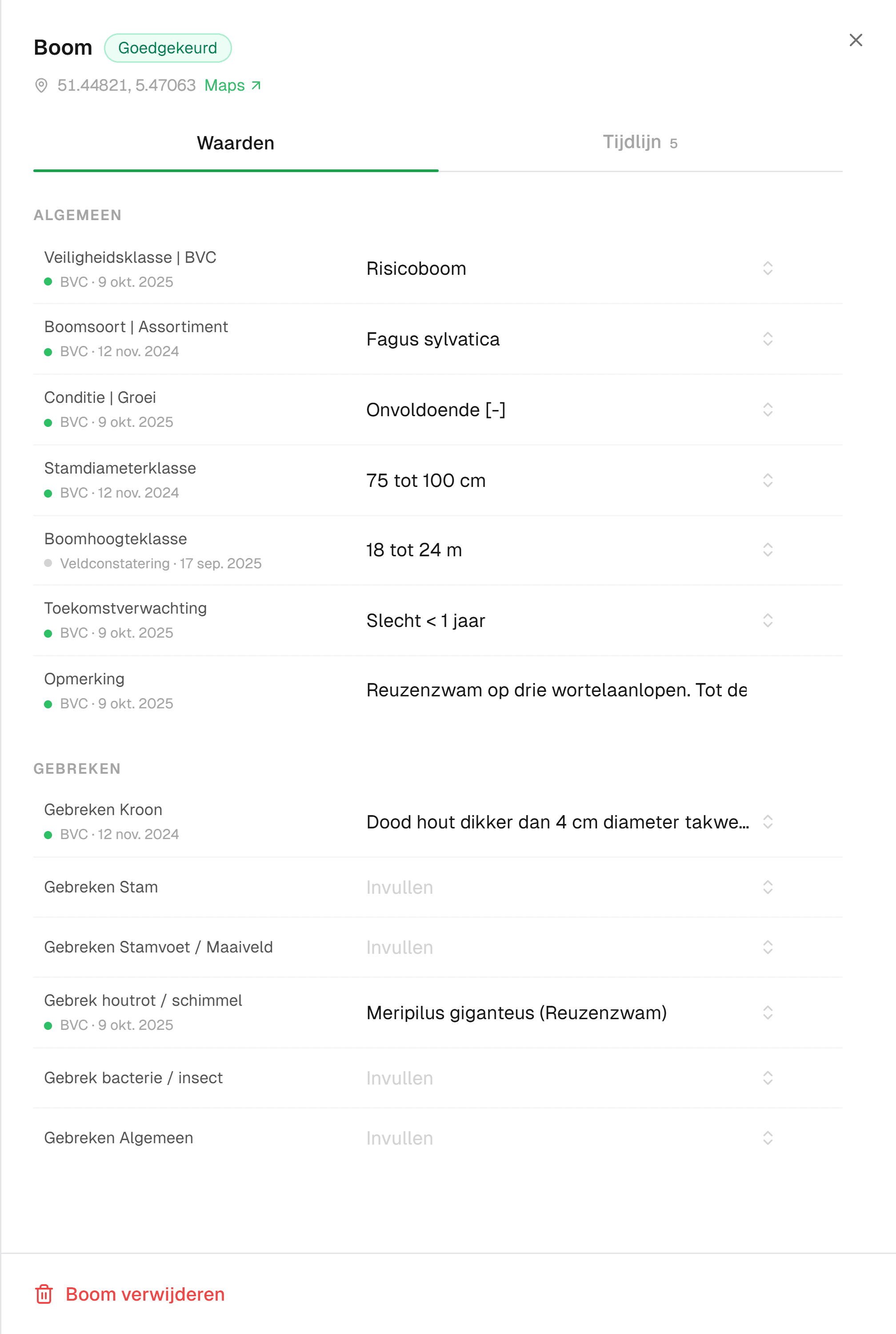
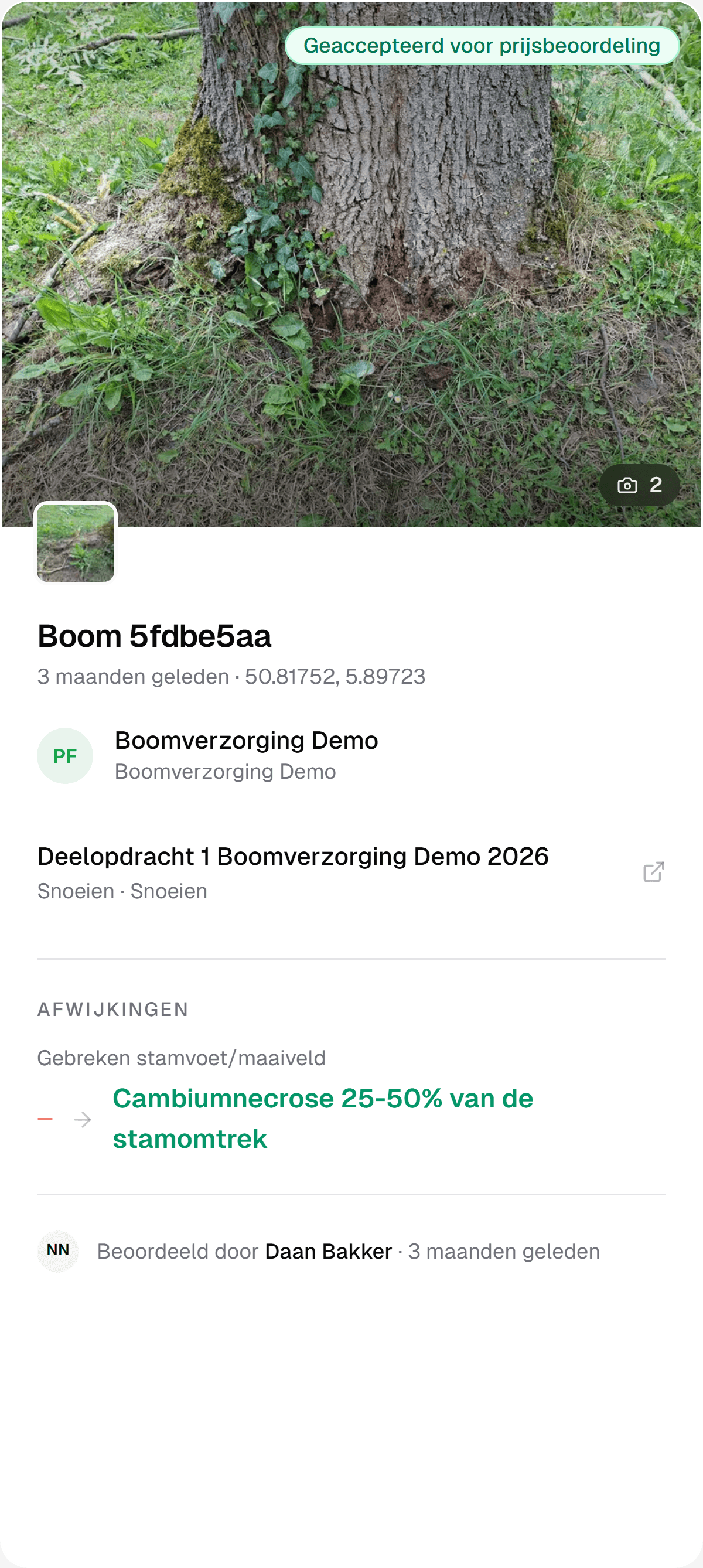
In IDA you look up the tree on the map or by number and open its dossier. The Waarden tab (values) shows what is known about the tree now, grouped the way your inspectors know it from the BVC (boomveiligheidscontrole, the Dutch tree safety inspection). Under each value is the source, with the date: from the original import, from an inspection, or from a field observation that a tree manager approved. The history of a value shows who recorded it.
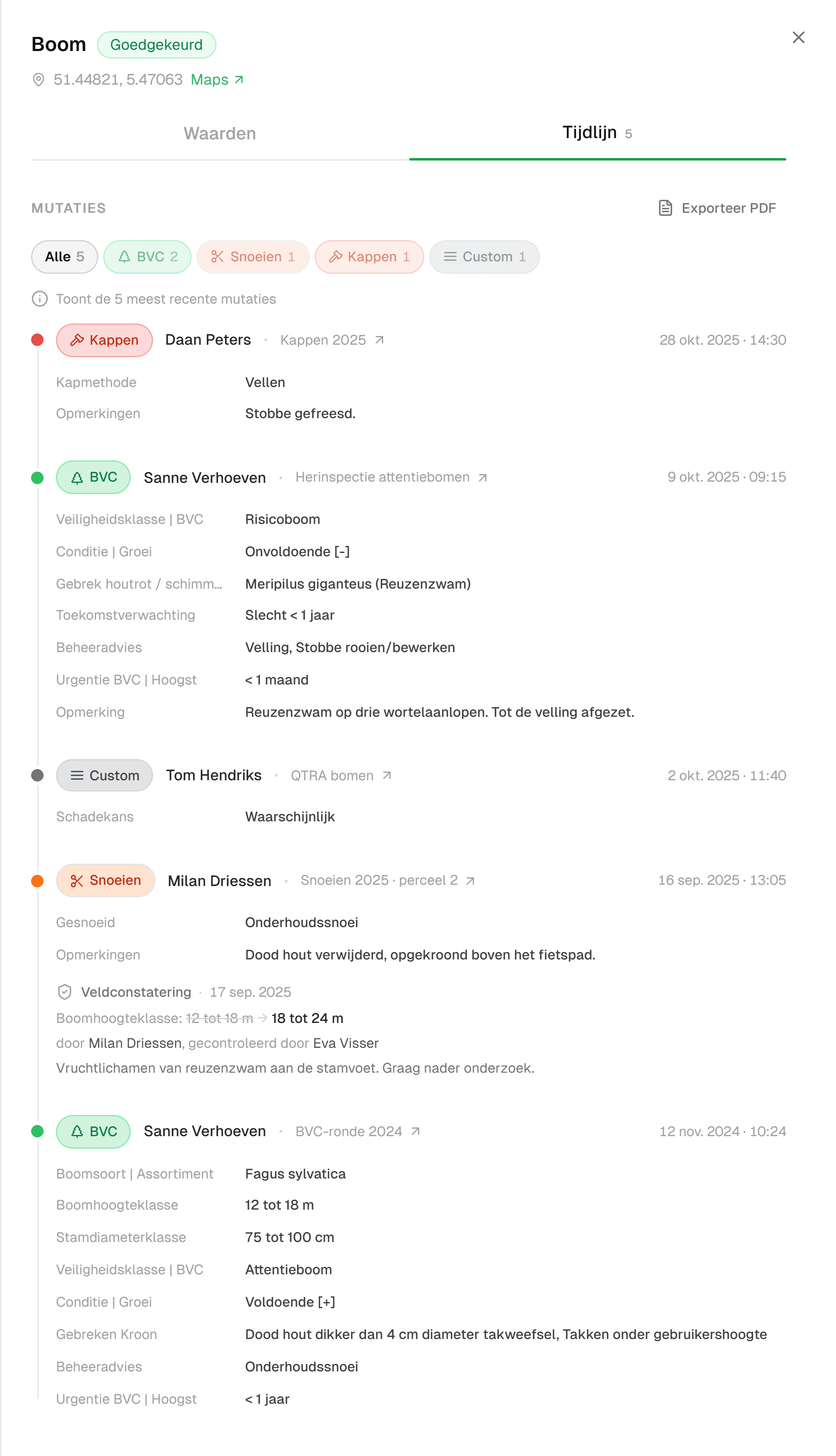
The Tijdlijn tab (timeline) is the story of the tree. Every inspection, every pruning and every report is in it, with the type, who recorded it, the project, the date and the time, and the values that were filled in then. The photos sit with the record they belong to, because the inspector took them at the tree, in the form.
With Exporteer PDF (export PDF) you turn it into one document: the tree on the aerial photo, all records in order with who carried them out, the photos and the approved deviations. That is what you send to the insurer.
Why this dossier convinces
The difference from a dossier put together afterwards is in three things.
It was recorded at the moment itself. The inspector filled in the form at the tree, on their phone. Date and time come from the record, not from the person who puts the dossier together.
Every change has a name. Whoever changes a value is shown with it. A deviation reported by a contractor enters the inventory only after a tree manager has reviewed it, and that review is in the timeline as well. If the follow-up question is who let the tree stand after the reassessment, the dossier shows which inspector assessed it and what advice they gave.
It is about this tree. Not about the policy, not about the district. An insurer's questions are about one tree, and so is the answer.
The rest of the day
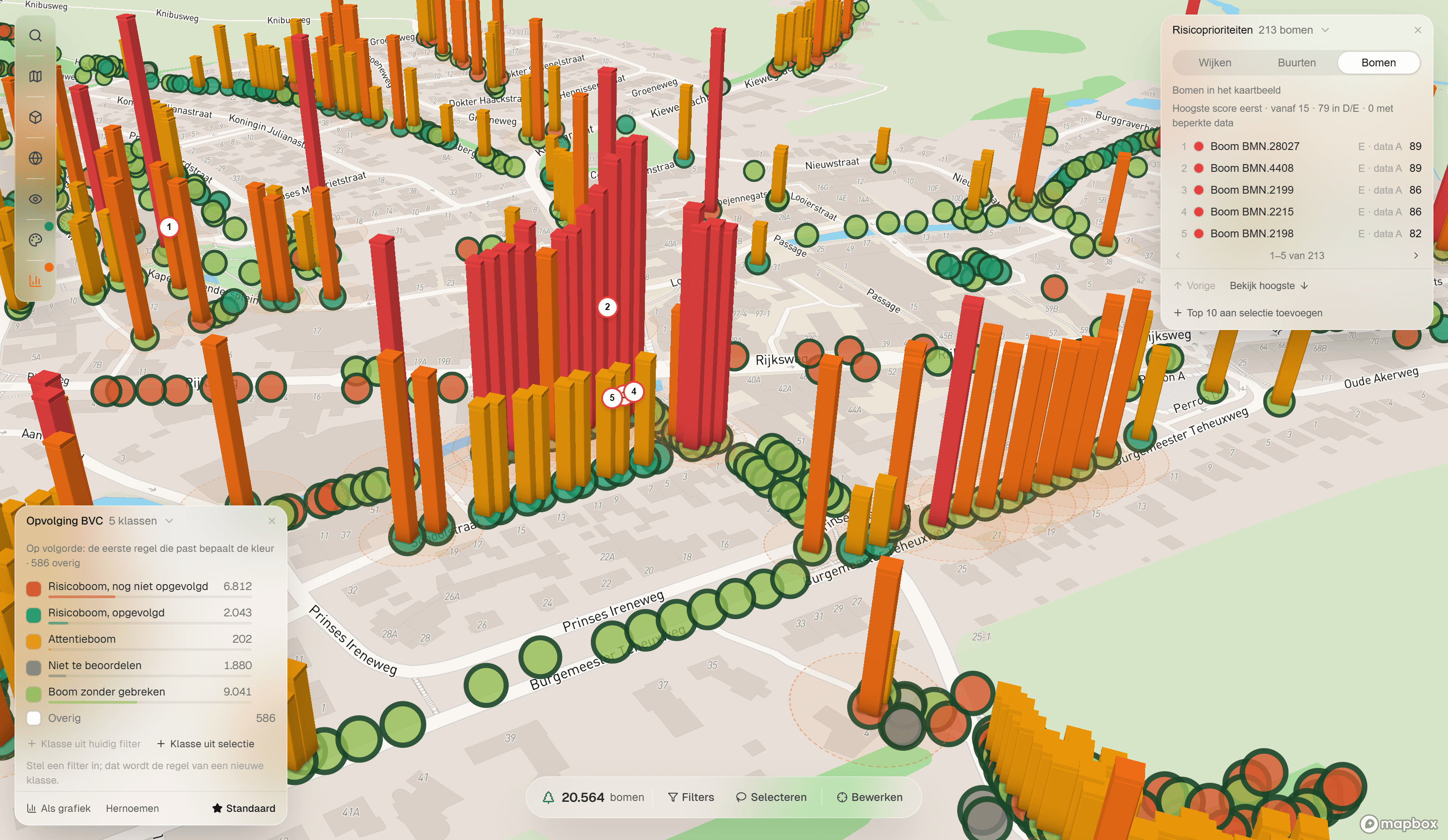
The claim is not the only thing. The fallen tree has to come out of the inventory, a new tree takes its place, and you want to know whether the trees next to it came through the storm well. In IDA you select the avenue on the map and turn it into a project for an extra inspection. The crew checks the trees with the form on the phone, and what they find is in every dossier the same day. Which trees you check first after a storm, you decide with the risk score per tree.
If a councillor asks a month later what was inspected after the storm, you open that project on the map. Every tree with the outcome, a date and photos.
Frequently asked questions
A tree dossier (boomdossier in Dutch, also called a boompaspoort or tree passport) is everything you know about one tree and have done to it, in order of time: the inspections with date and inspector, the defects and advice, the maintenance, the photos and the decisions. In IDA Bomen every tree has such a dossier, with the source under each value.
Whatever shows that the tree was inspected and that the outcome was acted on: the inspections with date, inspector and findings, the maintenance that followed, and photos. The more complete it is, and the closer to the moment itself it was recorded, the stronger. In IDA Bomen you export that per tree as a PDF.
Not automatically. Under Dutch law the owner of a tree is liable if they breached their duty of care, for example by not inspecting the tree or by leaving a known defect as it was. If an inspected tree without known defects blows over, that is as a rule not the case. That is why it comes down to what you can show.
Keep it for as long as the tree stands, and after that for as long as a claim can still come. A dossier is strongest when it shows the whole history and not the last inspection alone. In IDA Bomen every record is kept in the tree's history, also when a value changes later.
Read on
Storm damage from trees: who is liable in the Netherlands?
Under Dutch law a tree owner is only liable for storm damage if the duty of care was breached. What a municipality does and records around a storm.
8 min read
Duty of care for trees: what Dutch municipalities record
In the Netherlands the duty of care for trees follows from article 6:162 of the Civil Code. When a municipality is liable, and what you record per tree.
8 min read
Prioritising risk trees when the budget falls short
Prioritising risk trees after the inspection, when the budget falls short: IDA Bomen puts a risk score per tree next to the inspector's assessment.
6 min read
See your own tree inventory in IDA
Send us your tree inventory, as a shapefile, an Excel list or whatever you have, and we will show IDA on your own trees, from your own file to the approval of field work.
Used by